
Learn how to change background and use the Free Image Background Remover with EzRemove. Get professional results in seconds using AI-powered tools—no Photoshop required!
Introduction: Effortless Background Editing with EzRemove
Changing the background of an image or removing an existing one can often feel like a complex task, especially without access to expensive software like Photoshop. However, EzRemove simplifies this process with its Free Image Background Remover and Change Background tools, both powered by AI for fast, easy, and high-quality results.
In this blog, we’ll show you how to change backgrounds in your photos and remove backgrounds quickly using EzRemove’s powerful and free tools.
How to Use EzRemove’s Photo Editing Tools
1. Change Background in Photos
Changing the background of a photo can help you create stunning images for presentations, social media, product photography, or any creative project. This streamlined approach to photo editing saves hours compared to manual masking and allows creators to focus on composition and storytelling rather than technical execution.
Steps to Change Background:
- Upload Your Image
Visit Change background to any color and upload the image you want to edit. The tool supports JPG, PNG, and WEBP formats, and you can upload images up to 50MB. - AI Background Removal
EzRemove’s AI will automatically remove the background of your photo, keeping the subject intact. The tool detects edges, ensuring a clean separation between the subject and the background, even with complex details like hair. - Choose Your New Background
After the background is removed, you can choose a new background:- Select a solid color.
- Upload a custom background image to fit your vision.
- Use one of the pre-selected background options.
- Download Your Edited Image
After applying the new background, preview the image, and click download to get your photo with the fresh background.
Key Benefits:
- Simple & Fast: The AI-powered tool removes the background and lets you change it in seconds.
- Creative Flexibility: Choose from solid colors, custom images, or various pre-set background options.
- Completely Free: No charges for changing backgrounds or using any other feature.
2. Free Image Background Remover
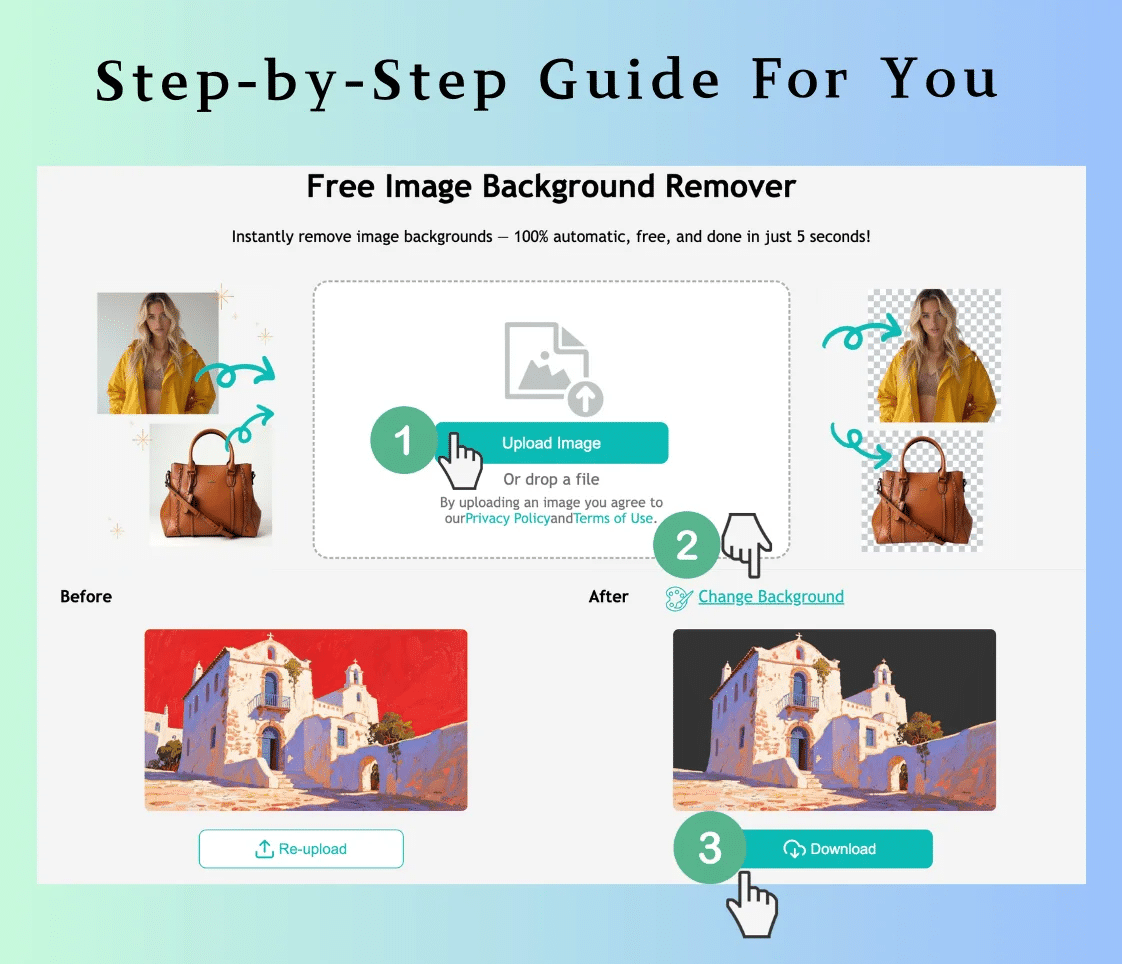
If you simply need to remove the background from an image to isolate the subject, EzRemove’s Free Image Background Remover is a perfect tool for the job. Whether you’re creating transparent images for your website, social media, or product listings, this tool will help you achieve clean and professional results in no time.
Steps to Use the Free Image Background Remover:
- Upload Your Image
Visit Free Image Background Remover and upload your image. The tool supports JPG, PNG, and WEBP formats. - Automatic Background Removal
EzRemove’s AI will automatically remove the background, leaving the subject isolated. The AI is designed to handle complex areas like hair, edges, and intricate details to ensure accuracy. - Download Your Transparent Image
Once the background is removed, you can preview your image and download it in PNG format with a transparent background, ready for use in any project.
Key Benefits:
- Automatic Removal: The AI quickly removes the background without the need for manual editing.
- High-Quality Results: It ensures that your subject looks crisp and clean, with no traces of the original background.
- Completely Free: Use the background remover tool without any hidden costs or subscriptions.
Why Choose EzRemove for Background Editing?
1. AI-Powered Precision
Both the Change Background and Image Background Remover tools use advanced AI technology to ensure high-quality, seamless results. The AI can detect intricate edges and handle complex image details like hair, making background removal or replacement effortless.
2. Free and Easy to Use
You don’t need to pay for expensive software or hire a designer. EzRemove is completely free and accessible directly in your browser. Simply upload your image, and let the AI handle the rest.
3. Fast and Efficient
The process of changing or removing backgrounds takes just seconds, helping you save time and increase productivity, whether you’re working on a single image or multiple.
4. Accessible Anywhere
Because EzRemove is web-based, you can access it from any device with an internet connection—whether you’re on your computer, tablet, or smartphone. No downloads or installations are required.
Real-World Use Cases for EzRemove
1. eCommerce Product Photography
For eCommerce sellers, clean product images are essential for a professional-looking website. EzRemove allows you to remove backgrounds from product photos or change backgrounds to make your products stand out and look their best.
2. Social Media Content Creation
Influencers, bloggers, and social media managers can use EzRemove to create unique images for Instagram, Facebook, or other platforms. Change backgrounds to fit the theme of your content or remove backgrounds to highlight a product or subject.
3. Photography and Design
Photographers and designers can use EzRemove for portrait background removal or to change backgrounds for creative projects. Whether you’re working on a photoshoot or a digital art piece, EzRemove makes background editing easy and fast.
FAQs: Background Removal and Editing Help
Q1: Is EzRemove really free?
A1: Yes! Both the Change Background and the Free Image Background Remover are completely free to use, with no hidden charges or subscriptions.
Q2: Can I use EzRemove on my phone?
A2: Absolutely! EzRemove works perfectly on mobile devices, so you can edit photos on the go, whether you’re using a smartphone or tablet.
Q3: What formats does EzRemove support?
A3:EzRemove supports JPG, PNG, and WEBP formats for image uploads.
Conclusion: Fast, Free, and Powerful Background Editing with EzRemove
Whether you need to change the background of your photo or remove the background completely, EzRemove offers a fast, easy, and free solution for professional-looking results. With AI-powered precision, these tools save you time and effort, giving you the freedom to create stunning visuals with just a few clicks.
Try EzRemove today and start editing your images with ease!