
Long reports can contain useful information, but finding the details that matter is not always easy. Whether you are reviewing a public research paper, reading a government report, or preparing a business briefing, you may need to go through dozens of pages before you understand the main points. After that, there is still the work of checking facts, organizing notes, and preparing a document that other people can read.
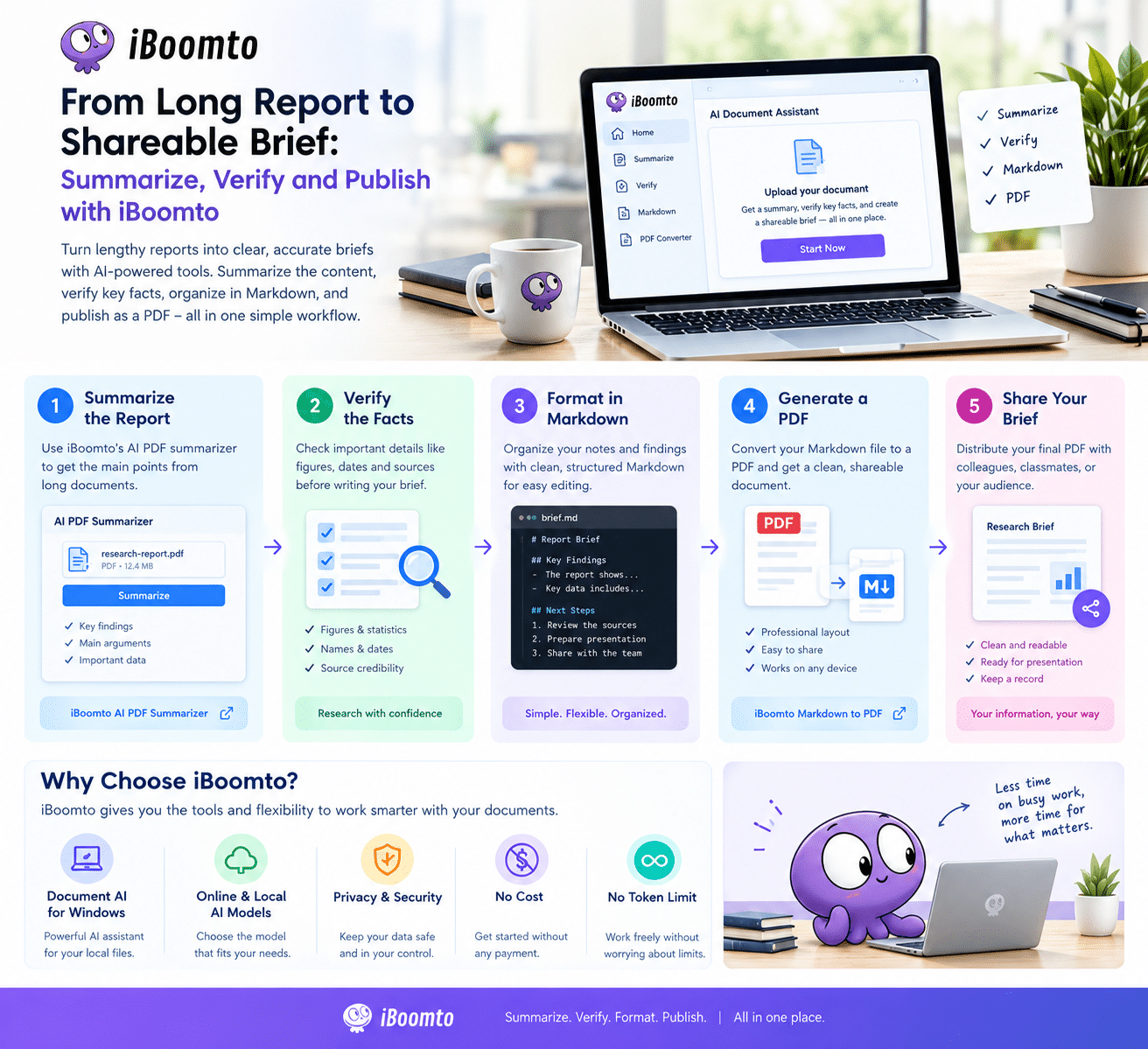
A simple workflow can make this process more manageable. With iBoomto, users can summarize documents, review important information, organize their findings in Markdown, and convert the finished brief into a PDF. This approach is useful for researchers, students, analysts, and other knowledge workers who need to turn large amounts of information into clear, shareable content.
Start by Summarizing the Original Report
The first step is understanding what a report actually says. Public reports often include background information, supporting data, explanations, and recommendations. Reading everything carefully is important for detailed research, but it can take time when you first need an overview.
The iBoomto AI PDF summarizer helps users process lengthy PDF documents and identify their main points. Rather than beginning with every page, you can use a summary to understand the report’s purpose, key findings, and major conclusions.
For example, imagine that a student needs to review a public report about employment trends. The document might include statistics from several years, explanations of industry changes, and recommendations for policymakers. An AI-generated summary can help the student identify the sections that deserve closer attention.
A business analyst could use a similar process when reviewing an industry report before a meeting. Starting with a summary makes it easier to identify relevant topics and decide which figures or statements need further investigation.
The summary should be treated as a starting point, not the final authority. AI tools can miss details or misunderstand context, so important claims should always be checked against the original report.
Verify the Facts Before Writing Your Brief
A short summary is useful only when its information is accurate. Before sharing findings with colleagues or publishing a briefing, take time to verify the important details.
Start with the facts that could change the meaning of the report. Check figures, dates, names, percentages, and statements attributed to specific organizations. If a report says that a figure increased by a certain percentage, return to the relevant table or section to confirm the number and understand what it measures.
It is also important to distinguish between a report’s findings and its recommendations. A research paper might present evidence of a trend without claiming that one particular policy caused it. A brief should preserve that distinction rather than making the original conclusion sound stronger than it is.
When working with public information, use the original publication as your primary reference. If you need to confirm a significant claim, look for supporting evidence in other reliable sources, such as official statistics, research institutions, or the organization responsible for the report.
An AI assistant can help locate information and organize questions for review, but human verification remains necessary. This is particularly important when the brief will influence a business decision, academic assignment, or public discussion.
Use Document AI on Windows to Manage the Workflow
Summarizing one document is useful, but regular research often involves several files and repeated tasks. This is where a dedicated document assistant can become helpful.
iBoomto offers a Windows document AI agent designed to support document-related work. Depending on the task, users can use AI assistance to summarize content, extract information, work with files, and organize material for further review.
The platform’s support for online and local AI models is particularly relevant to users with different working requirements. Online models can provide access to remote AI capabilities, while supported local models allow users to run AI tasks on their own computer.
Local processing can be useful when users want to keep more of their workflow on their device. However, the level of privacy depends on the model, settings, and features being used. Users should check which operations remain local and whether any information is transmitted externally.
For someone preparing a briefing, the benefit is a more organized process. Instead of repeatedly switching between applications to understand documents and collect information, users can use document AI to assist with the initial work before reviewing the evidence themselves.
The goal is not to automate every decision. It is to reduce repetitive tasks and leave more time for analysis, writing, and checking the details that matter.
Turn Your Notes into a Clear Markdown Brief
Once you have summarized the report and verified its important claims, the next step is to organize the findings into a brief.
Markdown is a practical format for this purpose because it supports headings, lists, links, and structured notes without requiring a complicated layout process. It is also easy to edit when new information becomes available.
A useful briefing might follow a simple structure:
- Overview: Explain what the report covers and why it matters.
- Key findings: Present the most important facts and results.
- Supporting evidence: Include figures, references, and links to the original sources.
- Limitations: Mention missing information or important qualifications.
- Next steps: Explain what readers should consider or investigate further.
This structure makes a long report easier to understand without removing the context behind its conclusions.
For example, a student preparing a research summary can organize the main arguments under separate headings. A professional preparing a management briefing can place the key figures near the relevant findings and include links to the original report for readers who want more detail.
Markdown also makes revisions straightforward. If a number changes after verification or a new source becomes available, you can update the relevant section without rebuilding the entire document.
Publish the Finished Brief as a PDF
Markdown works well for drafting, but a PDF is often more convenient when a briefing needs to be shared with a team, submitted for review, or stored as a final document.
The iBoomto Markdown to PDF converter helps users turn Markdown content into a PDF that is easier to distribute. This connects the writing stage with the final publishing stage of the workflow.
Once your brief is ready, review the headings, lists, links, and wording. Then convert the Markdown file into a PDF and check the resulting document before sharing it.
This final review is worth the effort. Make sure the information is presented clearly, the important figures match the original report, and the source references are easy to follow. If the PDF contains charts or tables, check that they remain readable in the final layout.
A well-prepared PDF gives readers a convenient document they can open and review without needing a Markdown editor. It also helps preserve a consistent version of the briefing for distribution.
A Practical Option for Everyday Work
Cost and setup can affect whether a tool becomes part of a regular workflow. Students, independent researchers, and small teams may not want to pay for several separate applications just to summarize reports and prepare documents.
iBoomto provides free access to selected tools and describes its offering as having no token limit. This can make the platform worth exploring for users who want to handle routine document tasks without immediately committing to a paid service.
However, the exact meaning of unlimited usage can depend on the specific tool, model, and current service conditions. Users should check the latest plan details and any applicable technical restrictions before relying on a feature for high-volume work.
The platform also offers online tools that do not require users to create an account. This can make occasional tasks more convenient because users can access a relevant tool without going through a registration process.
Privacy still deserves attention, even when an account is not required. Before processing confidential reports, review how the relevant tool handles document content and choose an appropriate workflow for the information involved.
Final Thoughts
Turning a long report into a useful briefing involves more than shortening the original text. The information must be understood, important facts must be verified, and the findings must be organized so other people can use them.
iBoomto supports this process by bringing together document AI for Windows, online document tools, and Markdown-to-PDF conversion. Users can begin with a PDF summary, return to the original sources to verify important claims, organize their findings in Markdown, and publish the finished brief as a PDF.
The combination can help students, researchers, and knowledge workers spend less time on repetitive document preparation and more time understanding the information in front of them.
The most reliable approach is to let AI assist with the work while keeping human judgment at the center. When summaries are checked, sources are documented, and the final PDF is reviewed before sharing, a lengthy report becomes much easier to turn into a clear and useful briefing.